Shopify or WordPress with WooCommerce? We compare real costs, fees, setup, SEO and security so you can choose the right platform for your online store.
If you are about to sell online, one question comes up almost every time: should you build your store on Shopify or on WordPress with WooCommerce? Both can run a successful business, and both have costs and limits that sales pages rarely mention. Choosing wrongly can mean a slow store, surprise fees or a rebuild a year later.
At Leadssinc we build online stores on Shopify, WordPress and custom code for businesses in the US, the UK and beyond. This guide explains the real differences in 2026, what each option costs to run, and how to decide without hype.
Shopify vs WordPress: the short answer
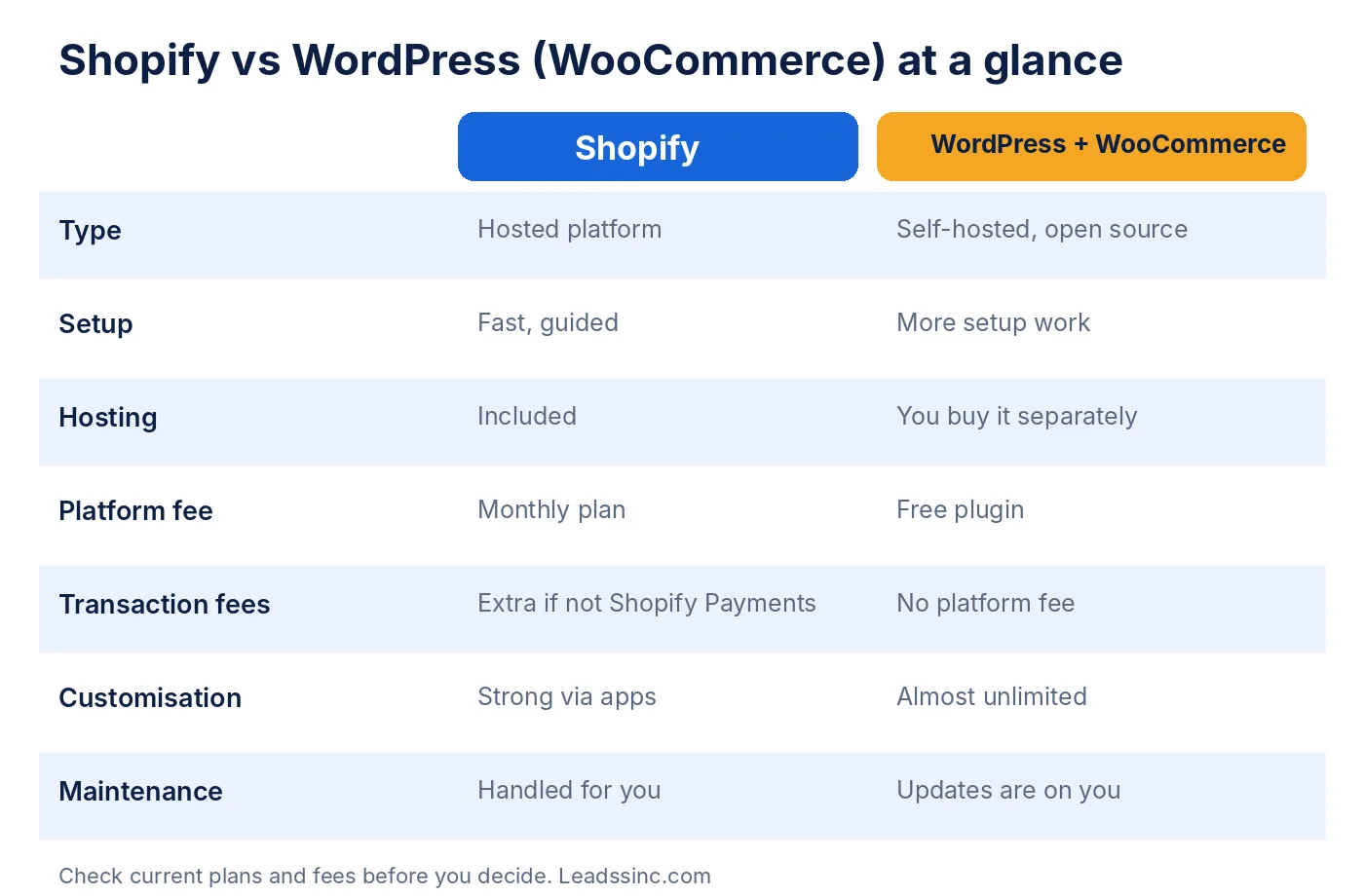
- Shopify is a hosted platform. You pay a monthly plan, and hosting, security and updates are handled for you. It is the faster, simpler route to a working store.
- WordPress with WooCommerce is open source and self-hosted. The software is free, but you buy hosting, manage updates and pay for extra plugins. It gives you more control and flexibility, with more responsibility.
Neither is always better. Shopify tends to suit businesses that want to launch quickly and focus on selling. WordPress suits businesses that publish a lot of content, want full ownership, or need custom behaviour. A custom-coded store can be the right call for complex needs, and we cover that near the end.
One clarification: "WordPress" alone does not sell products. To run a store on it you add the WooCommerce plugin, so the real comparison is Shopify vs WordPress with WooCommerce.
How each platform works
Shopify is software you rent. You sign up, choose a plan, pick a theme and add products. Shopify runs the servers, applies security updates and provides checkout. Extra features come from its app store.
WordPress with WooCommerce is software you own and host yourself. You choose a host, install WordPress and WooCommerce, pick a theme and add plugins for payments, shipping, SEO and more. You are responsible for keeping everything updated and secure.
Because WordPress needs hosting, your choice of host matters for store speed. We compare the options in our guide to the best web hosting in 2026.
What does each one really cost?
The headline prices are only part of the story.
Shopify costs
- Monthly plan: Shopify's core plans start at roughly $29 to $39 a month depending on billing, and rise to several hundred dollars a month for advanced plans. Check Shopify's own pricing page for current rates in your country.
- Apps: many useful features, such as subscriptions, advanced reviews or complex shipping, come from paid apps. Several apps can add up to a meaningful monthly bill.
- Transaction fees: if you use a payment provider other than Shopify Payments, Shopify adds an extra fee of roughly 0.5% to 2% depending on your plan. Shopify Payments avoids this extra fee, but it is not available in every country.
- Theme: many themes are free, and premium ones are a one-off cost.
WordPress and WooCommerce costs
- Platform: WooCommerce itself is free.
- Hosting: a small store can start on affordable shared hosting, but busier stores need better hosting. Providers such as Hostinger offer low-cost plans suited to getting started. (Disclosure: this is an affiliate link, and we may earn a commission at no extra cost to you.)
- Plugins and theme: payments, subscriptions, bookings and other features often need paid extensions.
- Maintenance: updates, backups and security take either your time or a developer's.
- Payment fees: you pay your payment provider's standard fees, with no extra platform transaction fee from WooCommerce.
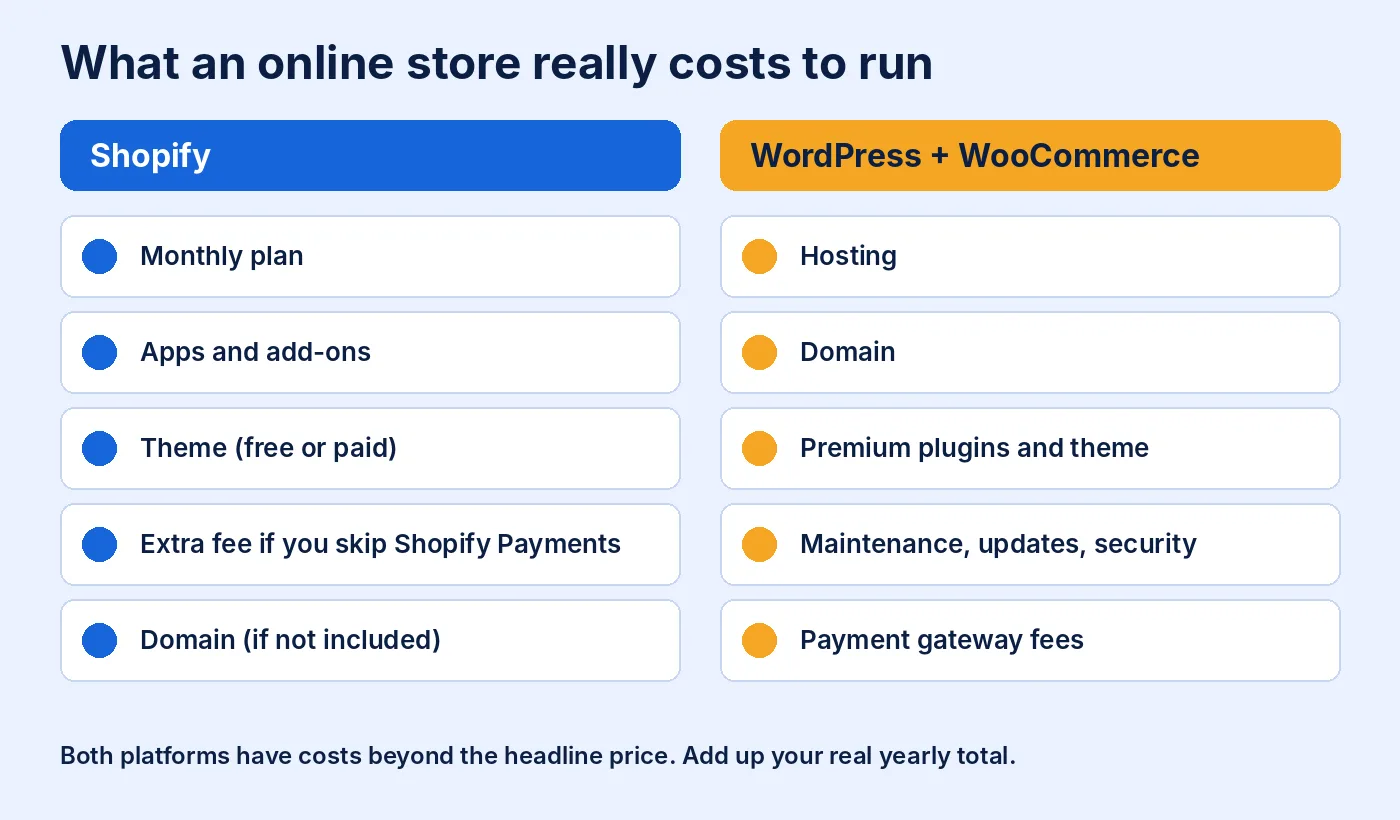
Which is cheaper depends on your size. A small store with simple needs can often run cheaply on WooCommerce. As sales grow, Shopify's fees and app costs can climb, while WooCommerce's costs move toward hosting and developer time. Compare your expected three-year total, not the first month.
What to do: List the features you need, then price the apps or plugins for each platform. Add hosting, maintenance and payment fees before you compare.
Ease of use and setup
Shopify wins on simplicity. A guided setup, built-in checkout and managed hosting mean a non-technical owner can have a store live in days. Support is also included.
WooCommerce takes more setup. You choose hosting, configure WordPress, install plugins and set up payments and shipping. It is very manageable with a developer, but it can overwhelm a beginner.
What to do: Be honest about your time and skills. If you do not want to manage updates and security, Shopify or a developer-managed WordPress store is safer.
Design and customisation
Shopify offers polished themes and a large app store. For most stores that is enough, but deep changes to the checkout are limited unless you are on its highest-tier plan.
WordPress offers far more freedom. You can change almost anything, from product pages to pricing rules to checkout flow. The risk is the same one we see on many WordPress sites: too many plugins and a heavy theme can slow the store down. Speed matters for conversions and for Google, so keep the plugin list short and the theme lightweight.
SEO and content
Both platforms can rank well. Shopify handles the technical basics, such as clean URLs, fast hosting and mobile themes, with little effort. WordPress has a long reputation for content marketing, so it suits stores that rely on blogs, guides and category content to bring in traffic.
What matters most is the same on either platform: fast pages, clear product descriptions, good internal links and original content.
Security and maintenance
On Shopify, hosting, SSL and platform security updates are managed for you. On WooCommerce, you or your developer must update WordPress, the theme and every plugin, and keep backups. Plugin vulnerabilities are a common way WordPress sites get hacked, so a store without regular maintenance carries real risk.
If you take payments, security is not optional. Whichever platform you choose, use trusted payment providers and keep everything updated.
Selling in the US and UK
Both platforms support selling in dollars and pounds, but there are local details to check:
- Taxes: US sales tax rules and UK VAT work differently, and both platforms have tools or extensions to handle them. Confirm your setup with an accountant.
- Payments: check which payment providers work in your country and what they charge.
- Privacy: UK and EU visitors expect cookie consent and a clear privacy policy under UK GDPR, and US stores should also publish clear privacy and refund policies.
- Shipping and returns: set clear delivery times and costs for each region you sell to.
Which should you choose?
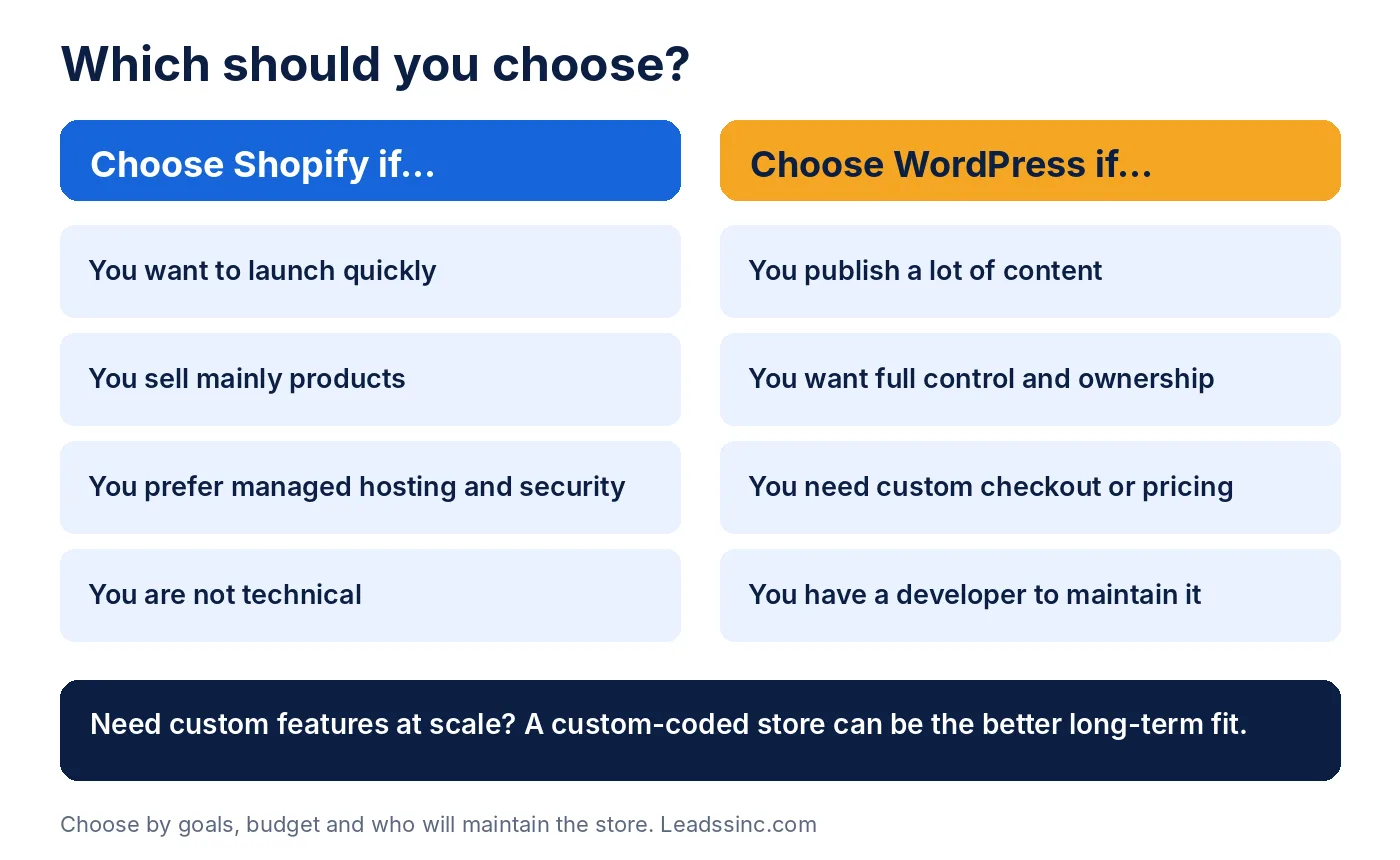
Choose Shopify if you want to launch quickly, you mainly sell products, you prefer managed hosting and security, and you do not want to deal with technical upkeep.
Choose WordPress with WooCommerce if content marketing is central to your business, you want full control and ownership, you need custom product or checkout behaviour, and you have a developer or agency to maintain the store.
Choose a custom-coded store if you have unusual requirements, such as complex pricing, integrations or a unique buying experience, and speed and ownership are priorities. This costs more upfront but can pay off for the right business. We explain the cost difference in our guide to how much a website costs in 2026.
A good rule: start with the simplest platform that meets your needs today, and make sure you can grow without rebuilding everything.
What to do: Write down your top five requirements, your monthly budget and who will maintain the store. The answer is often clear once these are on paper.
Common questions
Is Shopify better than WordPress for an online store? Neither wins every time. Shopify is easier and faster to launch, while WordPress with WooCommerce offers more control and flexibility. The better choice depends on your skills, budget and how your store will grow.
Is WooCommerce cheaper than Shopify? Often at the start, because the plugin is free and you only pay for hosting and extras. As you add plugins, maintenance and developer time, the gap can narrow, so compare the full yearly cost.
Does Shopify charge transaction fees? Shopify charges an extra fee if you use a payment provider other than Shopify Payments, roughly 0.5% to 2% depending on your plan. Your payment provider also charges its own processing fee on any platform.
Which is better for SEO, Shopify or WordPress? Both can rank well. WordPress is strong for content-heavy sites, and Shopify handles the technical basics with little effort. Fast pages and good content matter more than the platform.
Can I move from Shopify to WordPress later? Yes, but it takes planning. Products, customers and URLs need to be migrated carefully so you do not lose search rankings.
Ready to build your online store?
Leadssinc builds Shopify, WordPress and custom-coded stores for businesses in the USA, the UK and worldwide. Not sure which fits your business? Tell us about your products and goals, and we will recommend the right platform and give you a clear quote. You can see what we do on our Shopify store development page or explore our wider web development services. To get a starting price, use our cost calculator.
Found this useful?