Confused by website prices that range from $100 to $100,000? Here is what WordPress and custom-coded websites really cost in 2026, and how to choose.
Search "how much does a website cost" and you will see prices from $100 to $100,000. Both numbers are real, because they describe very different products. A template site and a custom-built site are built differently, perform differently and cost different amounts to own, whether you are a business in the US or the UK.
At Leadssinc we build both WordPress and custom-coded websites, so we see the trade-offs every week. This guide explains what you actually pay for, where cheap builds go wrong, and which option fits your business in 2026.
What does a website cost in 2026?
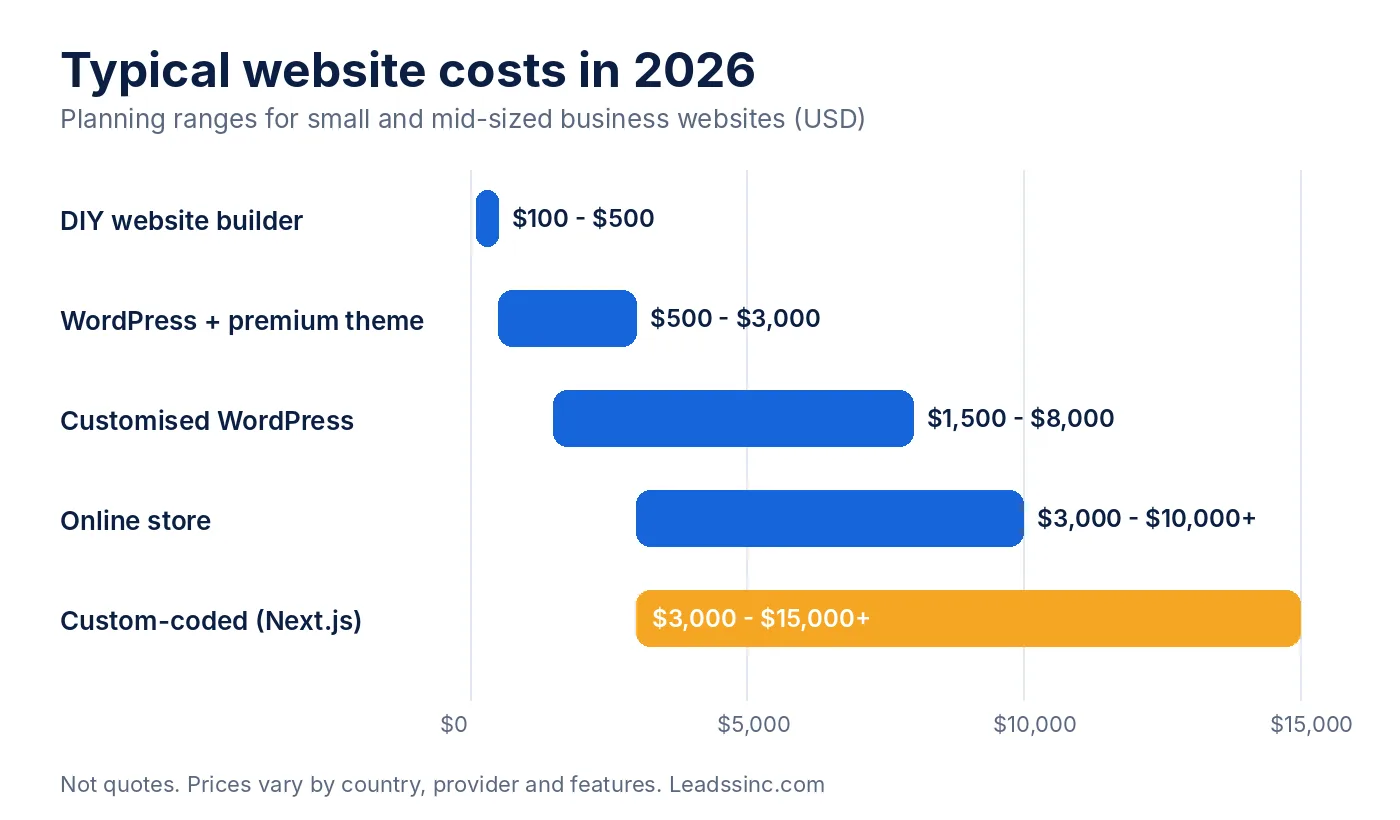
These are typical market ranges for small and mid-sized business websites. Your exact price depends on the number of pages, the design and the features you need.
- DIY website builder (Wix, Squarespace): about $100 to $500 for the first year.
- WordPress site from a premium theme: about $500 to $3,000, depending on setup and content work.
- Professionally customised WordPress site: about $1,500 to $8,000.
- Custom-coded website (Next.js, React, Node.js, Tailwind CSS): about $3,000 to $15,000 or more for a small business site, and more for portals, dashboards and web apps.
- Online store: about $3,000 to $10,000 for a standard store, and more for large custom builds.
UK businesses will see the same pattern in pounds. A basic template site from a freelancer often costs a few hundred pounds to around £1,000, while a bespoke build for a growing company can run to £10,000 or more. Prices vary by country, provider and features, so treat every figure here as a planning range, not a quote.
The launch price is only part of the story. Domain, hosting, maintenance and updates add yearly costs, and we cover those below. If you want a number for your own project, you can use our cost calculator and see custom and WordPress prices side by side.
What to do: Ask every provider for a written quote that lists the pages, features, hosting and anything not included. Two quotes only compare fairly if they cover the same things.
How a website project works
Whether you choose WordPress or custom code, a professional project follows the same stages. Knowing them helps you judge a quote and avoid surprise delays.
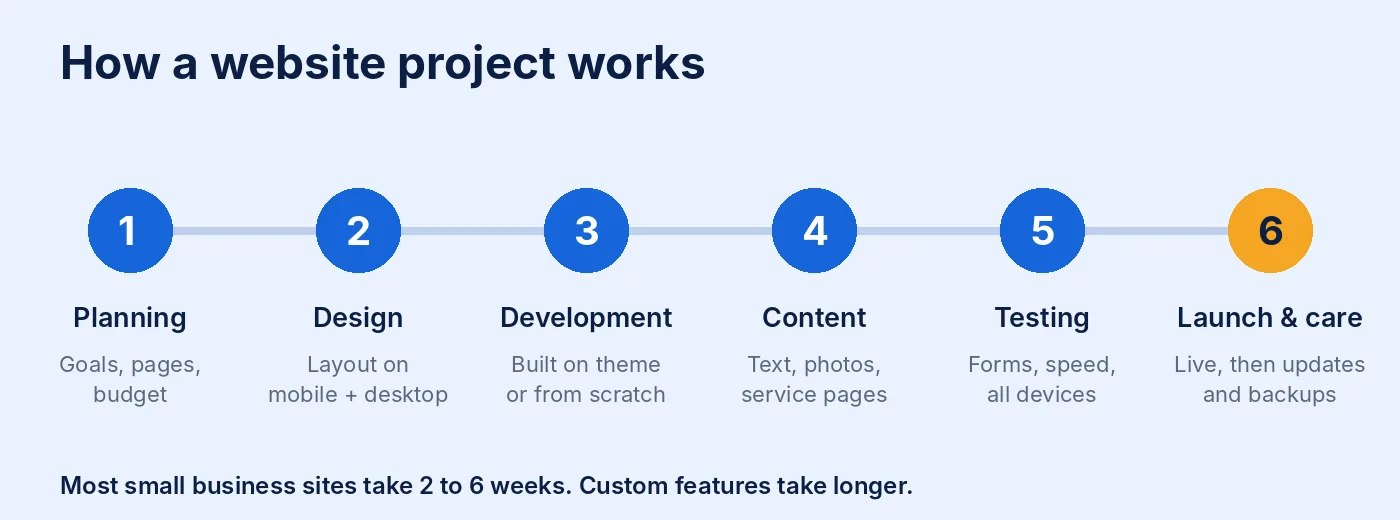
- Planning: what you sell, who your customers are and what a visitor should do (call, book, buy or enquire). This decides the pages, features and budget.
- Design: the page structure and visual design, on desktop and mobile.
- Development: the design is built, either on a WordPress theme or coded from scratch.
- Content: text, photos, service pages and case studies are added. This is where many projects get delayed, so prepare your content early.
- Testing: every page, form and button is checked on phones and desktops, and speed is measured.
- Launch and care: the site goes live, then needs updates, backups and monitoring.
Most small business sites take two to six weeks. Custom features take longer. If you are planning a project, our web development service page explains how we handle each stage.
What to do: Write down your services, prices, photos and the questions customers ask most before the project starts. Ready content is the easiest way to launch faster.
Domain and hosting in plain English
People often mix these up, so here is the simple version.
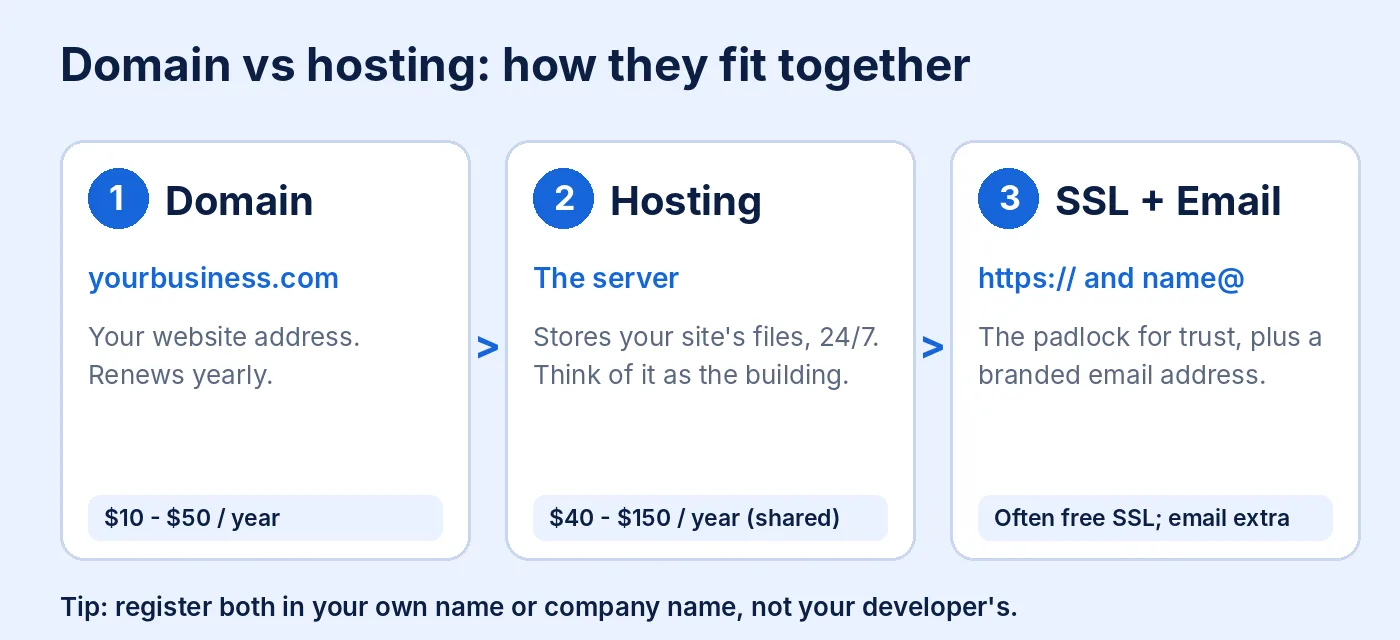
- Domain: your website address, such as yourbusiness.com. It renews every year and usually costs $10 to $50. UK businesses often choose a .co.uk or .uk domain to show local customers they are based in Britain, and a .com to cover international reach.
- Hosting: the server space where your website's files live. Think of the domain as the address and hosting as the building. Shared hosting commonly costs $40 to $150 a year, and managed WordPress hosting costs more.
- SSL: the padlock and "https" in your address. Good hosts include it free, and Google expects it.
- Business email: name@yourbusiness.com, usually a separate monthly cost or bundled with a plan.
Introductory hosting prices often rise at renewal, so always check the renewal price before you buy. If you want an affordable starting point, Hostinger is one of the lower-cost hosts for both hosting and domains, and it works well for WordPress and small business sites. Custom-coded sites built with Next.js or Node.js need a plan that supports them, so check the plan type before you buy. Use the coupon code RAHEEL at checkout to get a discount on your Hostinger plan (offers can change, so check the final price before you pay).(Disclosure: this is an affiliate link. If you buy through it, Leadssinc may earn a commission at no extra cost to you.)
What to do: Make sure your domain and hosting accounts are registered in your name or your company's name, not your developer's. You should always own your website.
WordPress: what you get, and where it goes wrong
WordPress is a free system for building websites. A WordPress site is made of three parts: WordPress itself, a theme that controls the design, and plugins that add features such as forms, SEO tools and online stores. It is affordable and easy to edit, which is why it powers roughly 40% of all websites, according to W3Techs. That share has slipped from its 2025 peak of about 43.6% as Shopify, Wix and custom builds grow.
The problems usually start with themes. There are four kinds:
- Free themes come from the official WordPress directory. They are safe but limited.
- Premium themes are paid, usually $30 to $100, and include updates and support for a period.
- GPL themes and plugins are legitimately distributed under WordPress's open-source licence. Some sellers resell them cheaply, but you usually do not get official updates or support from the original developer.
- Nulled themes are cracked copies of premium products shared for free. They are not the same as GPL. They often hide malware, spam links or backdoors, receive no proper updates, and put your website and your Google rankings at risk. They also involve piracy. Never use them.
Even a legitimate premium theme can produce a slow site. Multipurpose themes ship with dozens of demos, sliders and animation libraries, and your site loads code for features you never use. Every extra feature tends to become another plugin, and each plugin adds weight and one more thing that can break or go out of date. Add large images, a heavy page builder and cheap hosting, and pages that should load in two seconds can take ten. Visitors do not wait, and Google measures page experience through Core Web Vitals.
To be fair, WordPress is not automatically slow. A lean theme, a short list of trusted plugins, caching, optimised images and good hosting can perform very well. The problem is the cheap, quick build that skips all of that, which is why a $300 WordPress site and a carefully built $3,000 WordPress site are not the same product.
What to do: Test your site free on Google PageSpeed Insights. If your main content takes more than about three seconds to load on mobile, your theme and plugins are worth reviewing.
Custom-coded websites: what they are and the trade-offs
A custom-coded website is designed and programmed for your business instead of being assembled from a theme and plugins. A modern stack uses Next.js or React for fast pages, Node.js for the back end (forms, databases, dashboards, logins and payments) and Tailwind CSS for clean, lightweight styling.
The benefits are real:
- Speed: the site contains only the code it needs, with no unused demos, sliders or plugins.
- Ownership: the design, code and data are yours, with no theme or plugin licences to depend on.
- Smaller attack surface: there is no large plugin ecosystem to exploit, though good security practice still matters.
- Useful forms: enquiries can be saved to your own database and viewed in a private dashboard, and every form is tested before launch.
- A design built around your customers, not around a theme's layout limits.
A good agency will also tell you the limits:
- Higher cost and a longer build, typically several times a template site.
- Editing content: unless an admin area or CMS is built in, small text changes may need a developer. Ask about this before you sign.
- Not completely dependency-free: custom sites still use open-source libraries, hosting and services such as email delivery. The difference is that they are chosen deliberately and kept to a minimum.
- SEO must be set up properly: use server-rendered or static pages, which Next.js supports, rather than a purely client-side React site.
Businesses selling in the US and UK also need to handle a few legal basics on any platform: a cookie consent banner and privacy policy for UK and EU visitors (UK GDPR), and accessible design, which US businesses increasingly face legal pressure to provide. A custom build lets you build these in properly from the start.
What to do: If you choose custom code, ask who will make future changes, how content will be edited, and what a support plan costs.
WordPress or custom: which should you choose?
There is no single right answer. The best choice fits your goals, your budget and who will maintain the site.
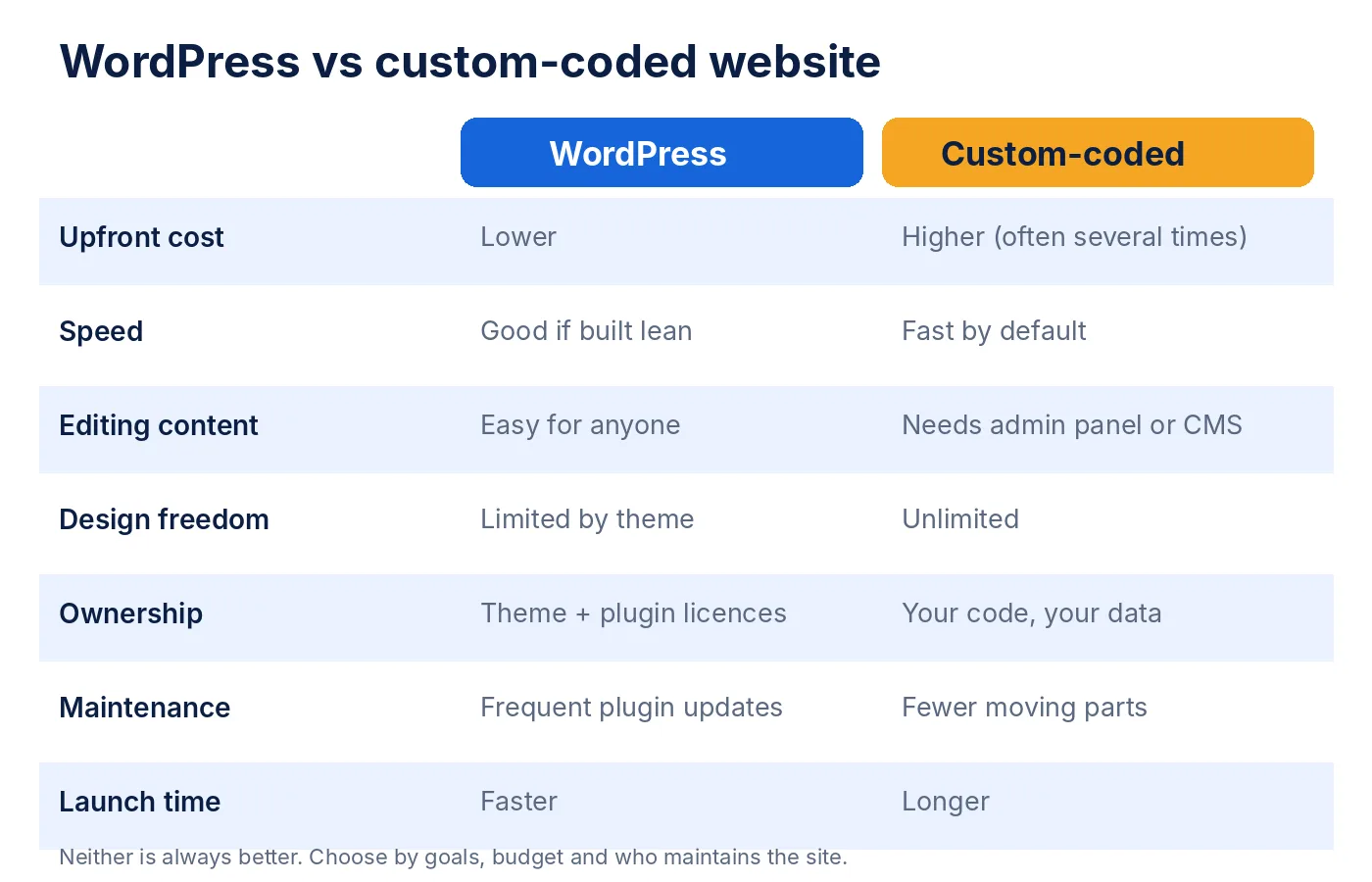
Choose WordPress if you have a smaller budget, need to launch quickly, want to edit pages yourself, publish a lot of blog content or need a straightforward brochure site. Insist on a lightweight theme, a short plugin list and good hosting.
Choose custom code if speed and user experience are central to winning customers, you need features like booking, portals or dashboards, you want full ownership of your code and data, or you are tired of fighting a bloated theme.
Choose Shopify if your main goal is selling products and you want a proven hosted store.
Over three years, a cheap site that is slow, gets hacked or needs rebuilding can cost more than a well-built site done once. Compare the total cost of ownership, not just the launch price: build cost, hosting, domain, maintenance and the cost of changes.
What to do: List your must-have features and who will update the site. If you need custom features, or speed is a priority, custom code usually pays off. If you need a simple site that you edit yourself, a clean WordPress build is a sound choice.
Ready to see your price?
Our cost calculator shows what a website costs at Leadssinc. Choose your number of pages and see the price for a custom-coded site and for a WordPress site side by side. If you would rather talk it through, our web development team will review your goals and recommend the right option, whether you are in the USA, the UK or anywhere else, with no pressure.
Found this useful?